iShred2.0.3
Publisher Description
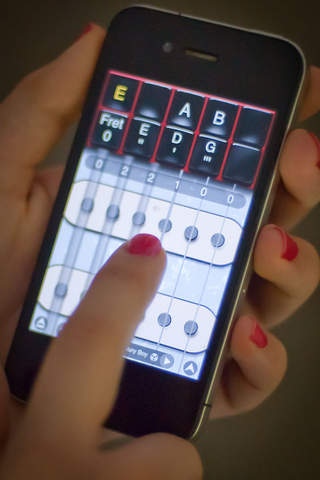
The electric guitar used on Atomic Tom's viral music video: http://bit.ly/iShredAtomic
No other iPhone guitar comes even close.
"High end technology for peanuts. Don't know how they do it. Stellar guitar app." - jjw14
"If you buy nothing else, buy this one. I'd give it 10 stars if I could!" - Jacksondale
"Of all the guitar apps available on the App Store, Frontier Design s iShred is my favorite." - MacWorld
"Jaw dropping superb app.can't live without it. Addicted & hooked : )" - fazali160677
"By the first strum, you realize that iShred is a virtual guitar like no other - it is in fact the tool for ultimate guitar supremacy on an MP4 player scale." - TouchMyApps
iShred starts with a set of high-fidelity guitar samples, then feeds them through eight exciting effects pedals and an overdriven amp simulator. Whether you want a clean trebly surf sound, a spacey rock lead, or an all-out metal assault, iShred delivers the goods. The sonic line-up includes these virtual stomp-boxes:
EFFECTS
* Hot Fuzz: Get buzzed with an electrifying distortion
* Wahsabi: Tilt your iPhone to control this wah pedal!
* Sybil: Dual chorus pedal to hear your evil twin
* HK-2000 Delay: For fat slap sound or huge echo
* K mpress r: Power chords just beg for it
* Adrenaline: Treble Booster for that extra shot
* Q-36 Space Modulator: Multi-pattern modulation
* Trembler: Get a healthy dose of Tremolo
iShred provides a playing interface that's both powerful and easy to learn. Create your songs from a huge library of over 2000 built-in chords, scales, and fret positions, by assigning them to the two rows of buttons at the top of the screen. The buttons give you immediate access to all the chords and scales you need for a song, and let you easily switch between strumming chords and playing melodies.
SOUNDS
High quality, professionally mastered guitar samples
Eight stomp-box effects and an amp simulator
Notes never "drop out" due to limited sample length
Adjust tuning to match recordings, other instruments
PERFORMANCE
Slide finger between buttons for fast chord transitions
Shortcuts for fast song editing and button reordering
Support for the left-handed guitarist
RECORDING
Record performances with optional metronome
Play along with recordings, even use different sound
Speed up or slow down performance after recording
SHARING
Send your songs to SoundCloud
Supports Audio Copy/Paste between other apps
Send songs to computer via iTunes file sharing
Share songs with our acoustic guitar app, GuitarStudio
Export songs as WAV or MIDI
AIRPLAY
A jukebox of shared songs from around the world
Share your performances and be rated by other guitarists
Download songs and performances from other players
Check out the AirPlay charts: http://fdgm.us/AirPlay
PLAY WITH MUSIC
Built in music player
Play along with iPod library or imported tracks
Setup a loop for practicing a song section
CHORDS
Easily create and save your own custom chords
Strumming position controls loudness of chords
Chords are easily reordered for fast access
SCALES
21 scales, available in 12 keys, let you play melodies
"Advanced moves": hammer-on's, pull-off's, and slides
User-selectable string labels
SONGS & PLAYLISTS
Combinations of chords & scales can be saved as songs
Songs can now have multiple pages of buttons
Add FX buttons to switch effect setups on the fly!
Songs can be edited, renamed, deleted
Backup songs to the network
Looking to add iShred's audible awesomeness to your REAL GUITAR? Pick up our free app, iShred LIVE! http://fdgm.us/iShredLIVE
STAY UP TO DATE
facebook.com/FDGMusic
twitter.com/FDGMusic
youtube.com/FDGMusic
soundcloud.com/FDGMusic
Requires iOS 4.3 or later. Compatible with iPhone, iPad, and iPod touch.
About iShred
The company that develops iShred is Frontier Design Group, LLC. The latest version released by its developer is 2.0.3. This app was rated by 1 users of our site and has an average rating of 4.0.
To install iShred on your iOS device, just click the green Continue To App button above to start the installation process. The app is listed on our website since 2009-02-06 and was downloaded 136 times. We have already checked if the download link is safe, however for your own protection we recommend that you scan the downloaded app with your antivirus. Your antivirus may detect the iShred as malware if the download link is broken.
How to install iShred on your iOS device:
- Click on the Continue To App button on our website. This will redirect you to the App Store.
- Once the iShred is shown in the iTunes listing of your iOS device, you can start its download and installation. Tap on the GET button to the right of the app to start downloading it.
- If you are not logged-in the iOS appstore app, you'll be prompted for your your Apple ID and/or password.
- After iShred is downloaded, you'll see an INSTALL button to the right. Tap on it to start the actual installation of the iOS app.
- Once installation is finished you can tap on the OPEN button to start it. Its icon will also be added to your device home screen.
